
pdfzus: The Best Alternative to PDF24 for PDF Zusammenfügen

When German users need to merge PDF files, PDF24 is often the first name that comes to mind. With its "Made in Germany" trust badge, completely free desktop software, and GDPR-compliant infrastructure, PDF24 has achieved near-monopoly status in the DACH market (Germany, Austria, Switzerland). However, while PDF24 excels at building trust, its web interface remains stuck in the Web 2.0 era—functional but outdated, reliable but lacking the modern user experience that today's users expect.
Enter pdfzus: a modern PDF merging tool that bridges the gap between PDF24's trusted reputation and the sleek, intuitive interfaces of international competitors. Built specifically for the German market, pdfzus combines the privacy-first approach that German users demand with a contemporary, professional design that doesn't compromise on trust signals. If you're looking for a PDF merging solution that respects your data privacy while offering a smooth, modern experience, pdfzus represents the evolution that PDF24 users have been waiting for.
Why PDF24 Dominates (and Its Limitations)

PDF24's dominance in the German market isn't accidental. The platform has built its reputation on three core pillars that resonate deeply with German users' values:
Trust Through Transparency: The "Made in Germany" label carries significant weight in a market where data protection is paramount. PDF24's servers are located in Germany, its privacy policies are transparent, and it offers completely free desktop software that appeals even to the most privacy-conscious users who avoid online tools entirely. According to security reviews, PDF24 encrypts file transfers and automatically deletes uploaded files after processing, maintaining a strong security record.
Zero-Cost Access: Unlike international competitors like Smallpdf or iLovePDF that limit free users to 2-3 merges per day, PDF24 offers unlimited free usage. This aligns perfectly with German users' expectation of genuine free tools without hidden paywalls. According to comparison reviews, these international tools often restrict free users with daily limits and file size caps.
GDPR Compliance: PDF24's commitment to GDPR (DSGVO) compliance and German data protection standards has earned it trust among users handling sensitive documents—from job applications to tax records. The platform's help documentation emphasizes its compliance with European data protection regulations.
However, PDF24's strengths are also its weaknesses. The platform's web interface feels dated, with a visual design that hasn't evolved beyond early 2010s web standards. For younger users (Generation Z) who have grown up with mobile-first, intuitive interfaces, PDF24's UX creates a noticeable disconnect. The interface prioritizes function over form, which works but lacks the polish and efficiency of modern SaaS tools.
Additionally, while PDF24 offers desktop software for offline use, its web-based tool still requires file uploads to German servers. While this is secure and compliant, it doesn't offer the ultimate privacy guarantee that client-side processing can provide.
pdfzus: The Modern Alternative
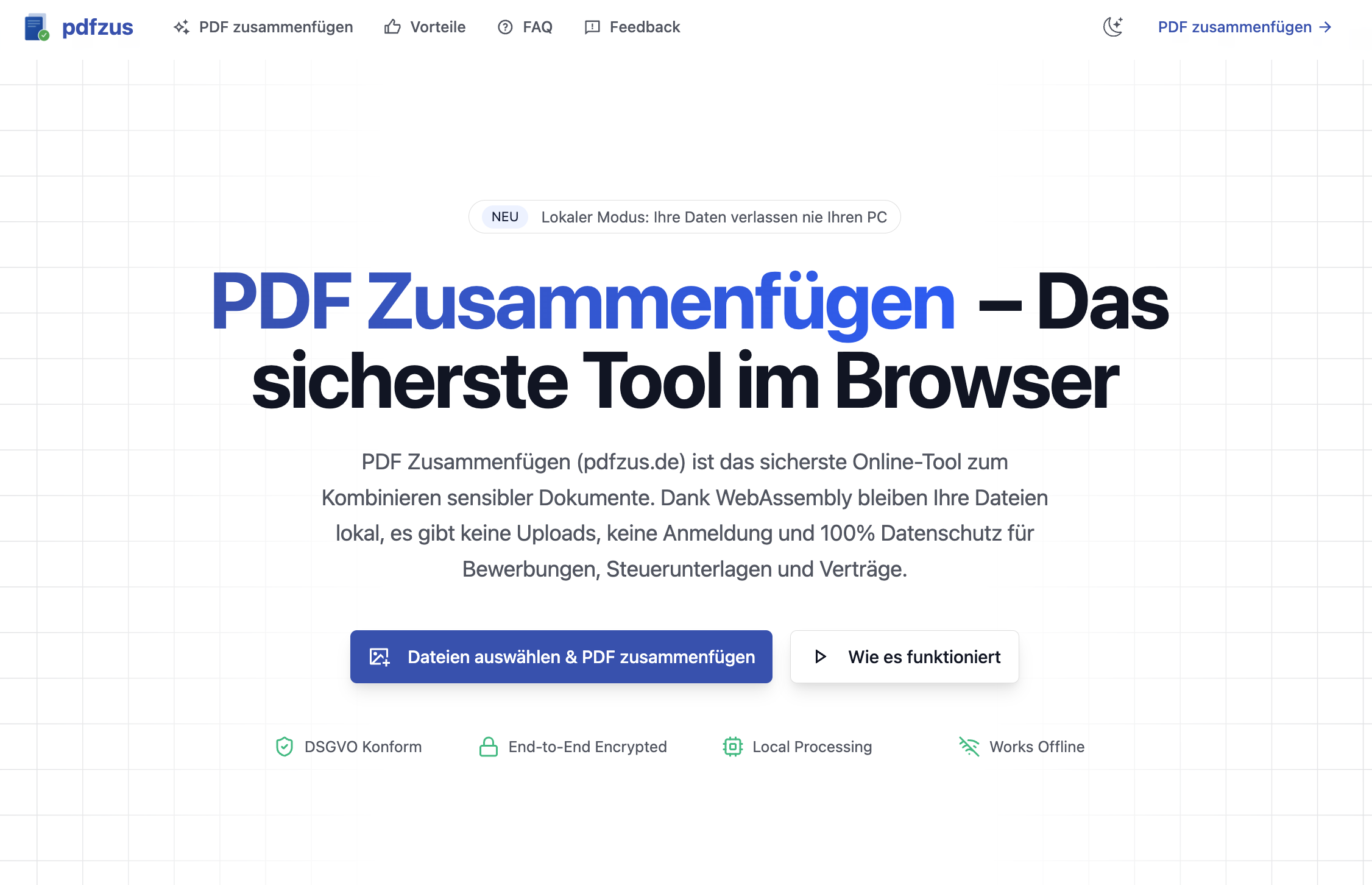
pdfzus was designed from the ground up to address PDF24's limitations while maintaining the trust factors that make PDF24 successful. The result is a tool that feels modern and professional while respecting the privacy-first values of the German market.
WebAssembly Architecture: Privacy Without Compromise
The cornerstone of pdfzus is its WebAssembly (WASM) architecture, which enables true client-side PDF processing. Unlike traditional online tools that upload files to servers, pdfzus processes all files directly in your browser. This means your documents never leave your device—not even temporarily. For German users handling sensitive information like bank statements, ID scans, or confidential business documents, this represents the gold standard of privacy protection.
This technical architecture isn't just a marketing claim; it's a fundamental shift that reduces GDPR compliance risk, eliminates server bandwidth costs, and enables pdfzus to offer truly free, unlimited usage without compromising on privacy. Similar client-side processing approaches have been demonstrated in WebAssembly-based PDF tools and privacy-first web applications, showing the viability of this approach.
Modern, Professional Design
While PDF24's interface prioritizes function, pdfzus demonstrates that professional design and trust can coexist. The platform features a clean, minimalist interface with a deep blue color scheme (#0056b3) that conveys reliability and professionalism—aesthetic choices that align with German corporate design language (think SAP, Allianz, Deutsche Bank).
The interface is intuitive without being flashy, professional without being sterile. Every interaction is designed to feel smooth and responsive, from drag-and-drop file uploads to visual page sorting grids. This modern UX doesn't sacrifice trust signals—DSGVO compliance badges, SSL encryption indicators, and "Made in Germany" messaging are prominently displayed.
Same Trust, Better Experience
pdfzus maintains all the trust signals that make PDF24 successful:
- DSGVO Compliant: Full GDPR compliance with transparent privacy policies
- Made in Germany: German development and infrastructure
- 100% Free: No watermarks, no subscriptions, no hidden costs
- No Registration Required: Use the tool immediately without creating an account
- SSL Encrypted: Secure connections for all interactions
But pdfzus goes further by offering:
- Zero-Upload Privacy: Files processed entirely in your browser
- Offline Capability: Works after initial load without internet connection
- Dark Mode Support: Modern interface that adapts to your preferences
- Mobile Optimization: Responsive design that works seamlessly on all devices
Feature Comparison
| Feature | PDF24 | pdfzus |
|---|---|---|
| Privacy Architecture | Server-side (German servers) | Client-side (WebAssembly) |
| File Upload Required | Yes | No (browser-only processing) |
| Offline Capability | Desktop app only | Web app (after initial load) |
| User Interface | Web 2.0 style, functional | Modern, professional design |
| Visual Page Sorting | Basic | Advanced drag-and-drop grid |
| Mobile Optimization | Limited | Fully responsive |
| Dark Mode | No | Yes |
| Watermarks | None (free) | None (free) |
| Cost | Free | Free |
| Registration Required | No | No |
| GDPR Compliance | Yes | Yes |
| Made in Germany | Yes | Yes |
Advanced Features in pdfzus
Visual Sorting & Drag-and-Drop: pdfzus offers an intuitive grid view where users can see thumbnail previews of every page, rearrange them with simple drag-and-drop gestures, and even rotate or delete individual pages. This is particularly valuable for job seekers who need to ensure their cover letter appears before their resume, or students organizing mixed-orientation documents.
Intelligent File Size Detection: When merging multiple files, pdfzus automatically detects if the resulting PDF exceeds common size limits (like the 5MB limit on many job application portals) and offers intelligent compression suggestions. This feature addresses a common pain point mentioned in PDF tool comparisons, where users struggle with file size restrictions. Users can also use pdfzus's dedicated PDF compression tool or PDF size reduction tool to optimize files before or after merging.
Batch Processing: Upload entire folders at once for efficient bulk processing—perfect for office administrators handling monthly invoice reports or tax document organization. This capability rivals what's available in PDF24's desktop software but works entirely in the browser.
Automatic Page Rotation: Mixed-orientation documents are automatically detected and rotated, eliminating the manual work required in basic tools. This intelligent processing demonstrates the power of modern WebAssembly-based PDF processing technologies.
Use Cases & Scenarios
The Job Seeker (Der Bewerber)

Lisa is applying for positions in Germany's highly formalized job market. She needs to combine her cover letter (Anschreiben), resume (Lebenslauf), and certificates (Zeugnisse) into a single, professional PDF. Any watermarks, format errors, or file size issues could jeopardize her application.
Why pdfzus: The visual sorting grid lets Lisa preview and arrange pages exactly as she needs them. The zero-upload architecture ensures her sensitive career documents never leave her device. Automatic file size detection helps her stay within portal limits, and the promise of no watermarks means her application looks professional.
The Office Administrator (Die Verwaltungskraft)

Thomas works for a Mittelstand (small-to-medium enterprise) and needs to combine hundreds of customer invoices into monthly accounting reports. He's concerned about GDPR compliance and company data processing agreements (AVV), but also needs efficiency.
Why pdfzus: Folder drag-and-drop enables Thomas to process dozens of files simultaneously. The client-side processing architecture means sensitive customer data never leaves the company network, addressing GDPR concerns directly. The DSGVO Konform badge and technical transparency give him confidence in the tool's compliance.
The Student (Der Student)

Julian is preparing his thesis submission, combining lecture notes, scanned diagrams, and Word documents. Some pages are landscape (Excel charts), others are portrait (text documents). He needs everything properly oriented and paginated. For scanned images that need to be converted to PDF first, Julian can use pdfzus's JPG to PDF converter before merging everything together.
Why pdfzus: Automatic page rotation handles mixed orientations seamlessly. The drag-and-drop interface helps Julian organize content logically. Offline capability means he can work on his thesis even without internet access after the initial page load.
The Home Office User
Sarah needs to quickly scan and merge documents but doesn't want to install heavy desktop software. She values speed, simplicity, and mobile optimization for when she's working from different locations.
Why pdfzus: The web-based tool loads quickly, requires no installation, and works perfectly on mobile devices. The modern, intuitive interface means Sarah can complete her task efficiently without learning complex software.
Conclusion
PDF24 has earned its position as Germany's trusted PDF tool through years of reliable service and unwavering commitment to privacy and free access. According to security reviews, PDF24 maintains a strong security record with encrypted transfers and automatic file deletion. However, the digital landscape has evolved, and users deserve tools that combine PDF24's trustworthiness with modern design and advanced privacy architecture.
pdfzus represents the next generation of PDF tools for the German market: maintaining all the trust signals that matter (DSGVO compliance, Made in Germany, completely free) while offering a modern user experience that doesn't compromise on privacy. With WebAssembly-powered client-side processing, your files never leave your browser—providing the ultimate privacy guarantee that even PDF24's server-based approach cannot match. This architecture aligns with the privacy-first movement in web tools, where client-side processing eliminates data transfer risks entirely.
Whether you're a job seeker preparing application documents, an office administrator handling sensitive business files, a student organizing academic work, or simply someone who values both privacy and modern design, pdfzus offers the best of both worlds: the trust you expect from German tools, with the experience you deserve.
Ready to experience the modern alternative? Try pdfzus today—completely free, no registration required, and your files never leave your device. Explore more PDF merging guides and articles or check out our comprehensive guide on PDF24 alternatives for German users to discover other privacy-focused PDF tools.
Works Cited
- PDF24: Solutions for all PDF problems - 100% free, accessed on January 15, 2025, https://www.pdf24.org/en/
- PDF24 Tools: Free PDF solutions for all PDF problems, accessed on January 15, 2025, https://tools.pdf24.org/en/
- PDF24 Creator - Download - 100% Free, accessed on January 15, 2025, https://tools.pdf24.org/en/creator
- Is PDF24 Safe? Security, Reliability & Review 2025, accessed on January 15, 2025, https://mconverter.eu/blog/is-pdf24-safe/
- How to merge PDF files into one PDF, accessed on January 15, 2025, https://help.pdf24.org/en/how-to-merge-pdf-files-…
- PDF24 Help Center, accessed on January 15, 2025, https://help.pdf24.org/en/
- Privacy-First Web Tools: Why Client-Side Processing is the Future, accessed on January 15, 2025, https://medium.com/@mohitphogat/privacy-first-web-tools-why-client-side-processing-is-the-future-cd88aacf9c63
- Browser-side PDF processing with Go and WebAssembly, accessed on January 15, 2025, https://dev.to/wcchoi/browser-side-pdf-processing-with-go-and-webassembly-4c0c
- Top Smallpdf Alternatives in 2025, accessed on January 15, 2025, https://slashdot.org/software/p/Smallpdf/alternat…
- iLovePDF vs SmallPDF vs PDF Techno: Which PDF Tool is Best in 2025?, accessed on January 15, 2025, https://www.pdftechno.com/de/blogs/ilovepdf-vs-sm…
- Best PDF Merge Software in Germany, accessed on January 15, 2025, https://sourceforge.net/software/pdf-merge/german…
- PDFHaven - Free Online PDF Tools | Merge, Compress, accessed on January 15, 2025, https://www.pdfhaven.tech/
- pdfzus - PDF Zusammenfügen: Das sicherste Tool zum PDF zusammenfügen, accessed on January 15, 2025, https://pdfzus.de/
- pdfzus - PDF komprimieren: schnell, lokal, kostenlos, accessed on January 15, 2025, https://pdfzus.de/werkzeuge/pdf-komprimieren
- pdfzus - PDF verkleinern: schnell, lokal, kostenlos, accessed on January 15, 2025, https://pdfzus.de/werkzeuge/pdf-verkleinern
- pdfzus - JPG zu PDF konvertieren: schnell, lokal, kostenlos, accessed on January 15, 2025, https://pdfzus.de/werkzeuge/jpg-to-pdf
- PDF24 Alternativen 2025: 8 beste deutsche PDF-Tools, accessed on January 15, 2025, https://pdfzus.de/posts/pdf24-alternatives-for-german
- PDF Zusammenfügen Posts, accessed on January 15, 2025, https://pdfzus.de/posts
MergeJPG Blog
News, resources, and updates about MergeJPG
pdfzus: The Best Alternative to PDF24 for PDF Zusammenfügen
Discover pdfzus, a modern PDF merging tool that combines PDF24's trusted reputation with sleek design. Learn why German users are switching to pdfzus instead of PDF24.
Read More

How to Merge JPG Files: Complete Guide (2025)
Learn how to merge JPG files with our comprehensive guide covering online tools, desktop software, and built-in solutions for Windows and Mac users.
Read More

Merge JPG Reviews: What Users & Media Are Saying About Us
Comprehensive collection of user reviews, testimonials, and media coverage of Merge JPG tools. Discover what users and media are saying about Merge JPG.
Read More